
MSI Codex Z2 vs. KOTIN RTX 5070 Gaming PC: Which Prebuilt Desktop Is Better?
Want a strong prebuilt 1440p or 4K gaming PC? The MSI Codex Z2 A8NVP-436US and KOTIN RTX 5070 / Ryzen 7 9700X Gaming PC share an NVIDIA GeForce RTX 5070 graphics card, but their hardware is quite different.
The MSI prioritises storage space, a simple cooling system, and a well-documented gaming-PC setup. The KOTIN is more enthusiast-focused, with the RTX 5070, Ryzen 7 9700X CPU, 360mm liquid cooler, 850W power supply, Wi-Fi 7, and integrated 11.3-inch display.
Key Differences
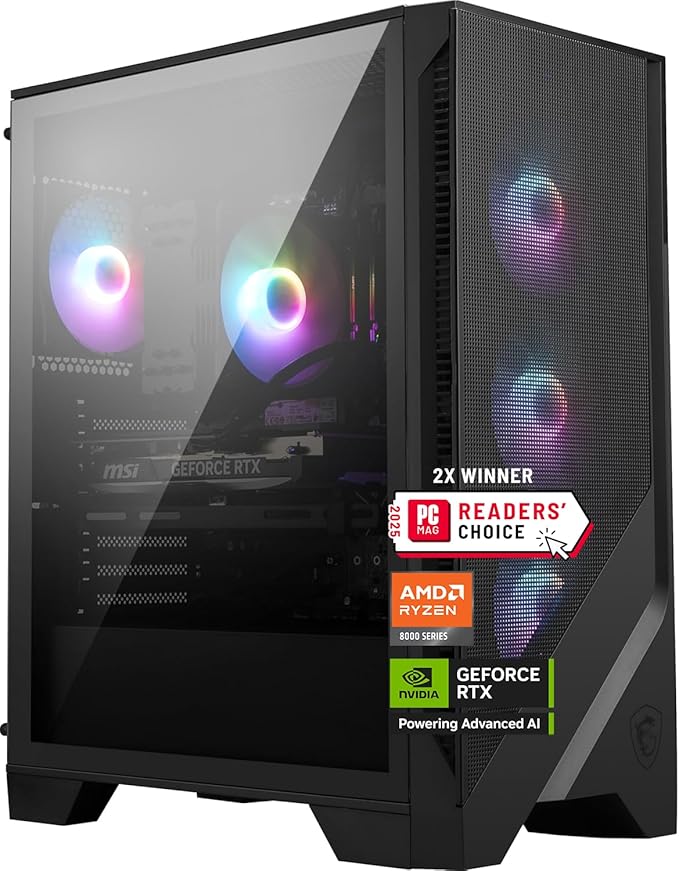
MSI's Codex Z2 has an AMD Ryzen 7 8700F, RTX 5070, 32GB of DDR5 RAM, a 2TB PCIe Gen4 NVMe SSD, a B650 chipset, 750W 80 Plus Gold power supply, Wi-Fi 6E, and an air-cooled CPU.
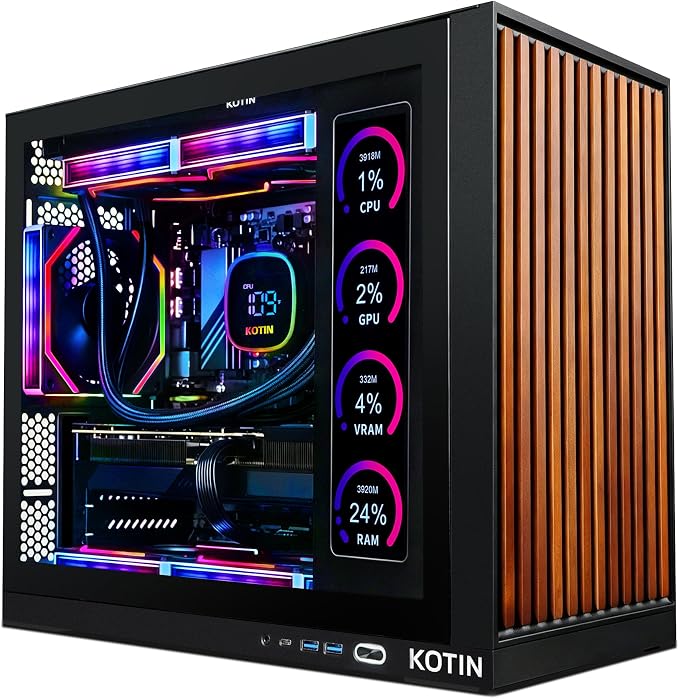
The KOTIN gaming PC features RTX 5070 graphics but AMD's Ryzen 7 9700X CPU. It has 32GB DDR5 RAM, 1TB SSD, 850W 80 Plus Gold PSU, 360mm AIO liquid cooling, Wi-Fi 7, ARGB lighting, and an innovative 11.3-inch integrated smart display.
In raw specs, the KOTIN is more performance-oriented, while the MSI has twice the storage and a simpler design.
Ryzen 7 9700X vs. 8700F Processor Performance
One of the greatest distinctions between the PCs is this.
MSI employs the Ryzen 7 8700F, an eight-core, 16-thread Zen 4 CPU with 5.0GHz peak clock and 16MB L3 cache. The default TDP is 65W and it supports DDR5.
The KOTIN utilises AMD's Zen 5-based Ryzen 7 9700X, which has eight cores and 16 threads. It has 32MB of L3 cache, double the 8700F's, and a 65W default TDP. It can accelerate to 5.5GHz.
AMD cites DDR5-5600 as the native maximum memory speed for the 9700X with a two-DIMM configuration, compared to DDR5-5200 for the 8700F. The 9700X supports PCIe 5.0 straight from the CPU in addition to PCIe 4.0.
In reality, the KOTIN is better for CPU-intensive tasks. Competitive games with high frame rates, simulation and strategy games, content production, multitasking, compilation, and other processor-intensive tasks should show the difference. Because both systems employ the same RTX 5070 and performance becomes GPU-limited at 1440p or 4K with high graphics settings, the CPU gap typically shrinks. Their CPU and GPU specifications suggest this.
CPU winner: KOTIN Ryzen 7 9700X.
GPU Performance
Graphics performance is similar since both PCs run the GeForce RTX 5070.
The desktop RTX 5070 from NVIDIA has 6,144 CUDA cores, 12GB of GDDR7 memory on a 192-bit interface, fourth-generation ray-tracing cores, fifth-generation Tensor cores, and DLSS 4 and Multi Frame Generation capabilities. NVIDIA markets the RTX 5070 as a powerful 1440p GPU.
KOTIN sells an RTX 5070 with 12GB of GDDR7 RAM, whereas MSI lists it for the Codex Z2 A8NVP-436US.
You shouldn't anticipate the KOTIN to boost GPU-limited gaming frame rates since the GPU class is similar. Despite differences due to graphics-card type, power constraints, cooling, memory setup, and CPU interaction, the RTX 5070 dominates at high graphical settings.
Both systems handle 1440p games well. The RTX 5070 may be utilised efficiently for 4K, especially with DLSS and Frame Generation, however taxing native-4K games with maximal ray tracing can strain the 12GB GPU.
The GPU category is tied.
Gaming at 1440p and High-Refresh Rate
Both PCs work well with 1440p 144Hz, 165Hz, 180Hz, or faster gaming monitors.
However, the KOTIN's Ryzen 7 9700X helps it achieve extraordinarily high frame rates in CPU-intensive games. For esports and competitive games with low graphics settings, the GPU is less likely to bottleneck. Newer Zen 5 architecture, greater boost clock, and bigger L3 cache give the 9700X an edge.
Because the RTX 5070 affects performance more in AAA titles at 1440p Ultra settings, the impact should be minimal.
For optimal competitive gaming performance, the KOTIN boasts the best CPU/GPU balance.
4K Gaming
Both systems employ the RTX 5070, therefore neither has a GPU edge. The 12GB GDDR7 card from NVIDIA supports DLSS 4 features including Super Resolution and Multi Frame Generation.
At 4K, games rely more on visuals than CPU speed, so the Ryzen 7 9700X advantage is less essential. Therefore, MSI and KOTIN should be closer while playing visually demanding 4K games.
Instead of a native-4K flagship, the RTX 5070 is a great 1440p card that can handle 4K. A stronger GPU tier is preferable for maximal ray tracing, native 4K, and high frame rates.
RAM and multitasking
Both machines have 32GB of DDR5 RAM, which is great for gaming.
32 GB is plenty for gaming, Discord, Chrome, OBS, Spotify, game launchers, and background utilities.
Most major picture, video, streaming, scripting, and productivity tasks can be done with it.
Thus, RAM capacity does not distinguish either system.
To ensure optimal performance, verify the memory speed and timings of each 32GB DDR5 kit before purchasing. Storage is a major MSI advantage.
Storage is one of MSI Codex Z2's biggest benefits.
MSI lists a 2TB M.2 NVMe PCIe Gen4 SSD for the A8NVP-436US. MSI offers double the storage out of the box. In the end, the KOTIN setup in this comparison has 1TB SSD storage.
This is more important than it seems. After Windows, apps, and numerous huge games are loaded, a 1TB HDD may fill rapidly. Modern AAA titles can occupy over 100GB.
The MSI offers a significant practical benefit for those who do not want to acquire more storage immediately.
MSI lists two M.2 slots and four SATA 6Gbps ports for storage expansion.
Storage champion: MSI Codex Z2.
Wifi
KOTIN advertizes Wi-Fi 7, whereas MSI lists 6E for the A8NVP-436US. If your router and network support Wi-Fi 7, the KOTIN has the latest wireless platform. MSI mentions Realtek Gigabit Ethernet for wired networking.
MSI has helpful USB connectors. USB 3.2 Gen 1 Type-A and 2x2 Type-C are on the front, while four USB 2.0, two 5Gbps, and two 10Gbps ports are on the back
The MSI has well-documented connection, whereas the KOTIN leads wireless networking.
The 11.3-inch KOTIN Smart Display
The KOTIN's 11.3-inch integrated display is uncommon. Amazon lists the 11.3-inch screen as part of this setup. This makes the case seem more unique than a prebuilt desktop.
An auxiliary case display may show system statistics, temperatures, utilisation, artwork, widgets, and other additional material, depending on software settings.
Although not required for game performance, individuals installing an extensive RGB gaming setup may enjoy it.
Without an integrated monitor, the MSI Codex Z2 is a traditional gaming tower.
Design and customisation winner: KOTIN.
Reliability, simplicity
Typical MSI configuration: Ryzen 7 CPU, air cooling, B650 motherboard, RTX 5070, NVMe storage, and 750W Gold PSU. MSI provides full specs and a one-year guarantee for the A8NVP-436US SKU.
Liquid cooling, an integrated screen, ARGB lighting, Wi-Fi 7, and a bigger power supply make the KOTIN more ambitious. The Amazon listing validates these key features. The choice between MSI's simpler system and KOTIN's enthusiast-style gear around the identical RTX 5070 is partially philosophical.
The choice is simple
If you value CPU speed, high-refresh-rate gaming, 360mm liquid cooling, an 850W PSU, Wi-Fi 7, the integrated 11.3-inch display, and superior GPU hardware, choose the KOTIN RTX 5070 / Ryzen 7 9700X.
The MSI Codex Z2 A8NVP-436US offers 2TB of fast PCIe Gen4 storage, a simplified air-cooled system, fully defined expansion options, USB-C, and MSI's one-year guarantee.
Final Decision
If both computers cost about the same, the KOTIN has better hardware.
The Ryzen 7 9700X has the edge. Both CPUs feature eight cores and 16 threads, however the KOTIN's Zen 5 processor has 5.5GHz, 32MB L3 cache, and PCIe 5.0, while the Ryzen 7 8700F has 5.0GHz, 16MB L3, and 4.0.
With its 360mm liquid cooler, 850W Gold PSU, Wi-Fi 7, and integrated display, the KOTIN seems like an enthusiast gaming setup. Storage is a major benefit of the MSI Codex Z2. Its 2TB Gen4 NVMe SSD is double the KOTIN's 1TB, making it easier to manage a huge game collection from the start.
I like the KOTIN for pure gaming performance and better specs. If you want a traditional prebuilt with double the storage and explicit MSI specs, the Codex Z2 is safer.